
Summary
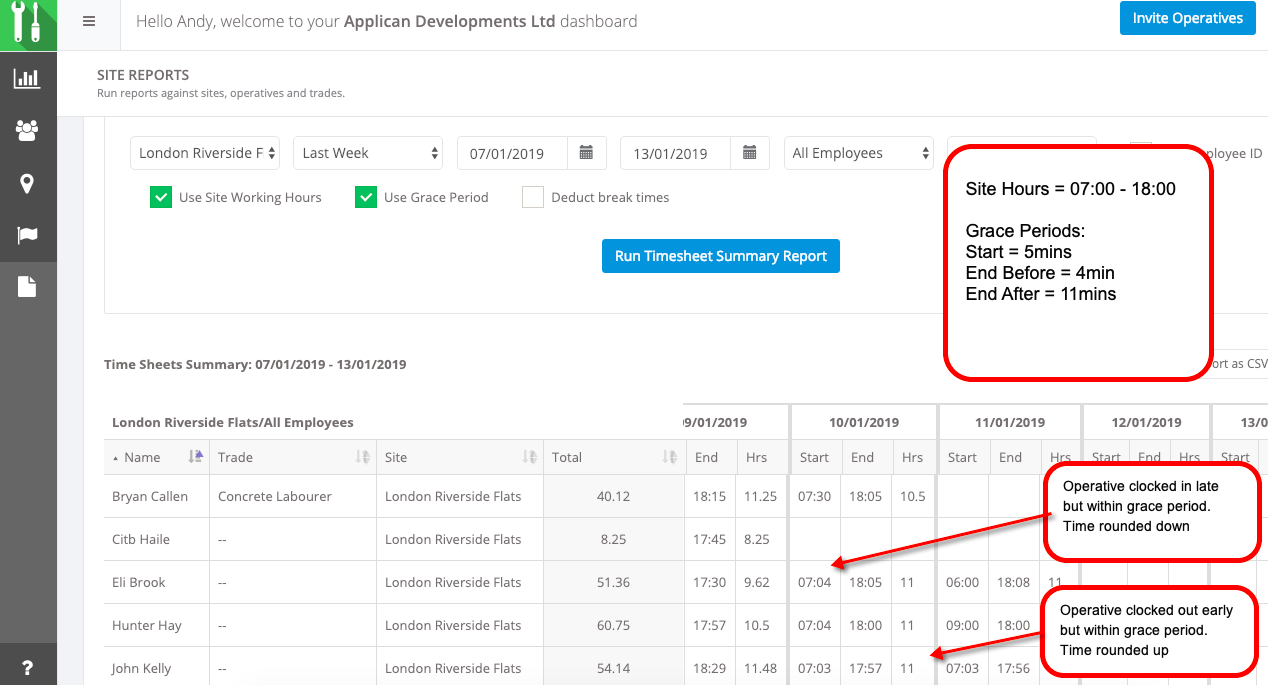
You can add a Grace Period to Clock In and Outs so that start or end times are rounded up/down. If you add a Grace Period for a Site, you can then select the Grace Period Filter in Timesheet Reports which will automatically apply the grace period when calculating Total Working Hours e.g.
Grace Period for Clocking In = 5mins
Site Start Time = 07:00
Operative Clocks in at 07:04
When Grace Period filter applied in Timesheet reports, Operatives Clock in time will start from 07:00
How to Report using Grace Periods
- Firstly, Working Hours and Grace Periods must be set for the Site
- Click on the Reporting Section in Applican
- Select the Site and timeframe you want to report on
- Click the tick boxes for Start Working Hours and Grace Period
- Click Run Report
- This will run the report and calculate the Total and Daily Working Hours based on the Start Hours and Grace PEriods set.
- *Note - Applican will still show the Actual Start and End Times however, the calculations are rounded up/down based on filters set
Comments
0 comments
Please sign in to leave a comment.